SCORM plugin for LearnDash, built for Articulate Storyline and Rise

Lessonbay SCORM Player runs your packages inside LearnDash Topics and records the result. It is free on WordPress.org. Pro completes the Topic automatically.

No external tools. No iframe hacks. Works directly inside LearnDash Topics.

Attach Storyline and Rise packages to LearnDash Topics
Record status, score, time and attempts as the package reports them
With Pro, complete the Topic automatically from the result

14-day money-back guarantee

LearnDash + Storyline Is Broken by Default

If you are using Storyline with LearnDash, this is where delivery, tracking, and completion usually break down.

LearnDash does not support SCORM natively
Most setups rely on iframe hacks
Completion is inconsistent or wrong
Resume and attempt handling break across sessions

The issue is not your Storyline content. The issue is the integration layer.

LearnDash SCORM integration with Storyline: what actually works

Most SCORM solutions inside LearnDash fail because they rely on workarounds instead of a proper runtime layer. If you want to understand how to run Storyline inside LearnDash with reliable tracking, attempts, and completion, this guide breaks down what actually works.

LearnDash SCORM integration guide →

Upload. Launch. Track. Complete.

Run Storyline and Rise packages inside LearnDash, with every result recorded in your own WordPress database.

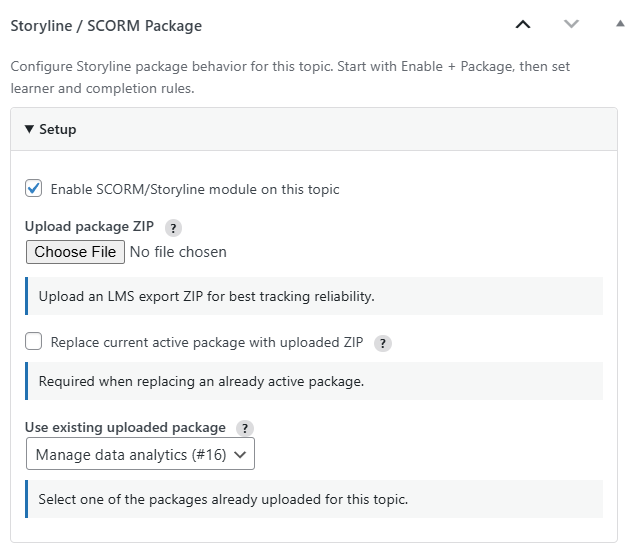
Upload screenshot

Start using Storyline in LearnDash today

No external tools. No iframe hacks. Works directly in your LearnDash Topics.

Start free. Add Pro when completion should be automatic.

Lessonbay SCORM Player (free)

  • Upload SCORM 1.2 packages from Storyline or Rise to a Topic
  • Launch them in a secure player inside LearnDash
  • Record status, score and time exactly as reported
  • Resume where the learner left off
  • Status, attempt count and last activity on the launch box
  • Your own launch button label
  • SCORM report with course, lesson, topic, status and learner filters
  • Learners complete the Topic with Mark complete
Pro

Lessonbay SCORM Player Pro

  • Automatic Topic completion from the result
  • Completion rules: require pass, require completion, or track only
  • Passing score threshold
  • Maximum attempts per learner
  • Hide Mark complete on self-completing Topics
  • Detailed report with every attempt and drill-down
  • CSV export and attempt deletion
  • Package insight warnings on the Topic screen

The free plugin runs and records your packages, with nothing locked. Pro turns the result into LearnDash completion and shows every attempt in a detailed report.

Choose the plan that fits your LearnDash setup

Replace external SCORM tools and complex setups with a native LearnDash solution.

Starter

1 Site

For individual course creators

€79/year

Run Storyline reliably on a single LearnDash site.

Get Starter
Most Popular

Studio

5 Sites

For freelancers and small teams

€189/year

Manage multiple LearnDash projects with full control.

Less than EUR 40 per site/year

Get Studio

Agency

Unlimited Sites

For agencies and large deployments

€399/year

Deploy across client sites without limits.

Built for multi-site delivery

Get Agency

* Annual subscription. Pay upfront. 14-day money-back guarantee. Cancel renewal anytime.

All paid plans include

Everything in the free plugin
Automatic LearnDash Topic completion
Completion rules and passing score
Maximum attempts per learner
Detailed report with every attempt
CSV export and attempt deletion
Plugin updates
Email support

Not ready for Pro? Start with Lessonbay SCORM Player, free on WordPress.org.

Frequently Asked Questions

Yes. This is a native LearnDash solution, so no external SCORM service is required.
Yes, and it is not a trial. Lessonbay SCORM Player is free on WordPress.org. It uploads SCORM 1.2 packages to LearnDash Topics, launches them in a secure player, records status, score and time exactly as the package reports them, resumes where the learner left off, and includes a SCORM report. Nothing in it is locked. Lessonbay SCORM Player Pro adds automatic Topic completion, completion rules, a passing score, attempt limits, the detailed report and CSV export.
Yes. Packages are attached to LearnDash Topics and access is checked through LearnDash before a module can launch. You also need WordPress 6.0 or newer and PHP 8.0 or newer.
Yes. Resume and the attempt count are part of the free plugin. Pro adds a maximum number of attempts per learner, after which the Topic locks.
In the free plugin the learner completes the Topic with the standard LearnDash Mark complete button. Pro completes it automatically from the package result, with a rule per Topic: require pass, require completion, or track only.
Almost always because the package was published from Storyline as a web export rather than an LMS export. A web export has no manifest and reports nothing back, so there is no score, completion or resume. Republish using Publish to LMS with SCORM 1.2. The topic screen shows the detected package type, so you can confirm it.
Yes, as long as it is published for an LMS as SCORM 1.2. Articulate Storyline and Rise LMS exports both work this way.
Yes. Any tool that exports a standard SCORM 1.2 package works the same way; the plugin reads the package, not the tool that made it.
Yes. A package is attached to an existing LearnDash Topic, so there is no need to rebuild the course.
One active package per Topic. You can upload more than one and switch which is active, and replacing a package keeps the Topic and its settings intact.
Yes. The Pro attempt limit counts completed, passed, failed and abandoned attempts, so a learner who closes the window mid-module has used one. Set the limit to 0 for unlimited.
All data is stored inside your WordPress database, in dedicated tables rather than scattered post meta. Nothing is sent to external platforms.
Tracking runs inside WordPress using dedicated storage and runtime processing, with no iframe dependency and no external sync delays.
Licences are per site and match the plan you choose: one site, five sites, or unlimited. Every paid plan includes the same features.
Pro features stop and Pro updates end. Lessonbay SCORM Player keeps working and keeps updating from WordPress.org, and your existing learner records are not deleted.
The plugin is now called Lessonbay SCORM Player. Deactivate the old plugin and install Lessonbay SCORM Player from WordPress.org; your packages, attempts and settings carry over. Pro customers install Lessonbay SCORM Player Pro 3.0.0 from their account page.

Start free today. Add Pro when completion should be automatic.

Run and track Storyline and Rise packages in LearnDash for free. Add Pro for automatic Topic completion, completion rules, attempt limits and the detailed report.